
Modern data platforms live or die by how quickly you can ship code to production.
For one of our recent projects, that speed was determined by something deceptively simple: adding a custom Python module to our distributed jobs.
We started on AWS EMR Serverless and later moved to Azure Databricks for compute jobs.
Both platforms can absolutely run serious Spark workloads—but the experience of customizing the runtime for a small Python dependency could not have been more different.
In this post, I’ll walk through:
- How EMR Serverless expects you to bring custom dependencies
- How Databricks compute handles the same problem
- A concrete story from our pipeline
- Where each approach actually makes sense in a real platform
1. Context: The “One Extra Module” Problem
Our use case was straightforward: we had a PySpark job that needed a custom Python module packaged as a wheel (.whl).
The module encapsulated some shared business logic we wanted to keep consistent across jobs—nothing exotic, just code that wasn’t available on PyPI.
On EMR Serverless, we tried to find the needed module in the latest available EMR images, we tried to understand the feasibility of adding it at job submission time and ended up building and maintaining a custom Docker image just to get that wheel into the runtime.
When we later moved the same job to Azure Databricks, I was able to install the same wheel through the UI in a few clicks—no Dockerfile, no ECR, no image pipeline.
That contrast is what this post is about.
2. How AWS EMR Serverless Handles Python Dependencies
2.1 What EMR Serverless Offers Out of the Box
Amazon EMR Serverless is a fully managed, auto‑scaling runtime for Spark and Hive that removes the need to manage clusters, capacity, and scaling policies.
For Python workloads, EMR ships with a curated set of Python and Spark libraries, and newer EMR releases (6.12 and above) even add commonly used data‑science libraries like pandas, NumPy, and PyArrow directly into the runtime.
That’s great—until you need something that isn’t in the base runtime.
2.2 Official Ways to Bring Your Own Python Libraries
The EMR Serverless documentation describes three main strategies for Python dependencies:
- Attach Python archives or modules at job submission time
- Use spark.submit.pyFiles to point to .py, .zip, or .egg files stored in S3.
- Example: –conf spark.submit.pyFiles=s3://bucket/path/custom_module.zip.
- Pack a virtual environment and mount it into the job
- Build a virtualenv on an Amazon Linux 2 machine with the same Python version as EMR Serverless.
- Archive it using venv-pack and upload the .tar.gz to S3.
- Reference it with spark.archives and override PYSPARK_PYTHON to use the environment’s interpreter.
- Build a full custom Docker image (EMR Serverless Custom Images)
- Start from the official EMR Serverless base image (for example public.ecr.aws/emr-serverless/spark/emr-6.9.0:latest).
- Install OS packages and Python libraries using yum/pip.
- Push the resulting image to Amazon ECR.
- Configure your EMR Serverless application to use that image via the imageConfiguration / image URI.
All three approaches work, but each pushes complexity into a different part of the system: job configuration, build environment, or container infrastructure.
2.3 The Path We Took: Custom Docker Image for EMR Serverless
Because the module we needed was internal and versioned as a wheel, we chose the custom image route.
On paper this sounded clean: bake everything into a single immutable runtime image and reuse it for all jobs that shared those dependencies.
In practice, the workflow looked like this:
- Create a Dockerfile based on EMR Serverless’ public base image
- Example (simplified):
- text
FROM public.ecr.aws/emr-serverless/spark/emr-6.9.0:latest
USER root
COPY my_module-0.1.0-py3-none-any.whl /tmp/
RUN pip3 install /tmp/my_module-0.1.0-py3-none-any.whl
- USER hadoop:hadoop
- The docs explicitly show this pattern for bundling Python libraries, packages like pandas / NumPy, and even specialized stacks like Apache Sedona.
- Build and validate the image locally
- Build the image with Docker, then validate it using the EMR Serverless Image CLI (amazon-emr-serverless-image-cli) to ensure compatibility with EMR’s runtime.
- Push the image to Amazon ECR
- Create an ECR repository, tag the image with the ECR URI, and push it.
- Set appropriate repository policies so EMR Serverless can pull the image.
- Wire the image into the EMR Serverless application
- When creating or updating the EMR Serverless application, provide the image URI in the image configuration so all subsequent job runs use our custom image.
- Update cycle for any change
- Any minor change—new version of the module, an extra dependency, even a small bug fix—meant repeating the Docker build, validate, push, and application‑update steps.
This is fairly standard container‑driven infrastructure, and if you already have strong image pipelines and security gates, it fits naturally into your existing process.
But for the specific case of “I have one small wheel that I want on the runtime,” it did feel heavy.
2.4 Pain Points We Hit
A few practical issues surfaced immediately:
- Long feedback loop
- Fix a bug in the module → rebuild image → push to ECR → update EMR application → rerun job.
- This added minutes to every dependency change, even during early experimentation.
- Build‑environment friction
- EMR requires the Python environment used to build virtualenvs/libraries to match the runtime (Amazon Linux 2, specific Python versions).
- Ensuring consistent Docker base images and build hosts was extra overhead just to support one module.
- Security and compliance overhead
- Once you introduce custom images, you also own vulnerability scanning, SBOM generation, and patch cycles for those images in addition to AWS’ base images.
- From a DevSecOps perspective this is good discipline—but for a single, stable wheel, it’s a lot of ceremony.
- Platform‑team ownership
- Data scientists and analysts couldn’t just “add a library” themselves; they had to go through the platform/DevOps team to rebuild and publish images.
None of these are flaws in EMR Serverless—it is intentionally designed around immutable container images and strict runtime control.
But they do shape the developer experience in a very specific way.
3. How Azure Databricks Compute Handles Custom Libraries
We had a requirement to move the same workload to Azure Databricks. We approached the problem as “okay, where is the Databricks equivalent of our EMR custom image?”
Instead, we found that Databricks treats libraries as a first‑class configuration surface on compute itself.
3.1 Library Model in Databricks
Databricks lets you install libraries onto compute resources—clusters, SQL warehouses, or serverless jobs—so that all notebooks and jobs attached to that compute share the same dependency set.
These libraries can come from several sources:
- Public package repositories (PyPI, Maven, CRAN)
- Workspace files (uploaded wheels, JARs, etc.)
- Unity Catalog volumes
- External cloud object storage locations (for example, Azure Data Lake Storage)
The key difference: Databricks does not require you to build a custom container image for most dependency scenarios.
Instead, you attach libraries dynamically at the compute layer through UI, REST API, or Terraform.
3.2 Our Actual Workflow in Databricks
For the same custom wheel, our Databricks workflow looked like this:
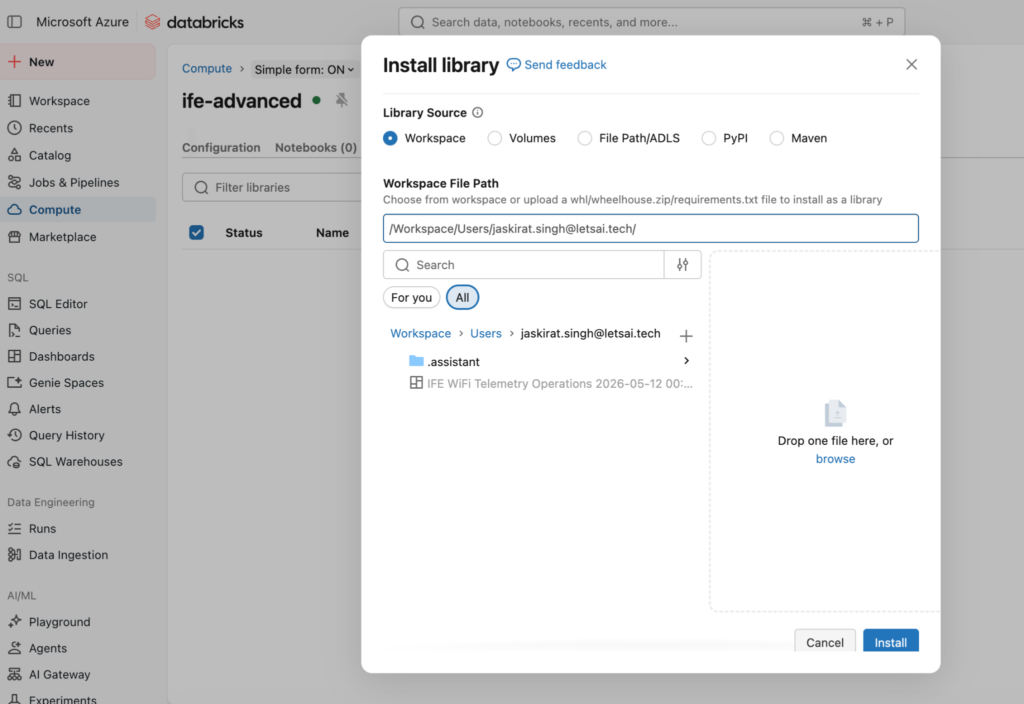
- Upload the wheel to Workspace Files
- In the Databricks UI:
- Go to Workspace in the left sidebar.
- Navigate to my user directory.
- Import the .whl file into the workspace at a path like
/Workspace/Users/myuser/my_module/my_module-0.1.0-py3-none-any.whl.
- In the Databricks UI:
- Attach the wheel as a compute‑scoped library
- Go to Compute → select the relevant cluster.
- Open the Libraries tab and click Install new.
- Choose Library source: Workspace, then browse to the uploaded wheel and click Install.
- The screenshot I attached to this conversation is literally that “Install library” dialog open on our cluster—no Dockerfile in sight.
- Use the module in notebooks and jobs
- Once the library installation completed, every notebook and job attached to that cluster could import the module as if it were any other installed package.
- Iterate quickly
- If we needed a new version, the loop was: build wheel → upload → reinstall on the cluster.
- For experimentation, it felt almost like working on a local venv, but on managed distributed compute.
This wasn’t just convenient—it fundamentally changed who could own dependency management.
3.3 Other Databricks Options Worth Knowing
Beyond compute‑scoped libraries, Databricks also supports:
- Notebook‑ or job‑scoped libraries via pip in notebooks or job environments, especially for ML workflows.
- Model‑level packaging using MLflow’s add_libraries_to_model() utility for model serving, where custom wheels travel with the model artifact itself.
But for this specific pipeline, cluster‑scoped libraries from workspace files were the perfect middle ground: simple, reproducible, and visible in the UI.
4. Side‑by‑Side Comparison: EMR Serverless vs Databricks for Custom Libraries
Here’s how the two approaches felt in practice for our “one extra module” scenario:
| Dimension | AWS EMR Serverless | Azure Databricks Compute |
| Primary mechanism we used | Custom Docker image based on EMR Serverless base runtime. | Compute‑scoped library installed from a workspace‑uploaded wheel via the UI. |
| Packaging for a custom wheel | Bake wheel into image, rebuild + push image to ECR, update EMR application to use that image. | Upload wheel to Workspace or Volume, click Install new, select wheel, done. |
| Who typically owns the workflow | Platform/DevOps team with Docker, ECR, and IAM expertise. | Data engineers / ML engineers can manage it directly; platform team mostly sets guardrails. |
| Feedback loop for dependency changes | Minutes: rebuild image, push, update application, wait for EMR to pick it up. | Seconds to a couple of minutes: re‑upload wheel and reinstall library on cluster. |
| Security & compliance posture | Very strong for container‑centric orgs; custom images can be fully scanned and version‑controlled, but add operational overhead. | Strong at the library level; you still need scanning for wheels and PyPI dependencies, but you’re not responsible for base OS image maintenance. |
| Runtime immutability | Extremely high: runtime fully defined by container image; great for regulated environments and strict change control. | High at the cluster level, but more dynamic; libraries can be added/updated without rebuilding images, which is great for iteration. |
| Complexity for “simple” customization | High relative to problem size; feels like using a sledgehammer for a thumbtack. | Low; the platform meets you where you are with first‑class library install flows. |
5. When EMR Serverless Still Makes Sense
After moving to Databricks, it’s tempting to declare EMR Serverless “overly complex,” but that would be unfair.
There are scenarios where EMR’s custom‑image model is exactly what you want:
- Strictly regulated environments
- If you must prove that every byte in your runtime comes from a hardened, pre‑approved image, EMR’s custom image + ECR pattern is very appealing.
- Heavy OS‑level customization
- Need a non‑standard Python version, custom native libraries, or system packages installed at the OS layer?
- EMR explicitly supports customizing Docker images to install alternate Python versions (for example Python 3.10) and additional OS packages.
- Strong container‑native culture
- If your organization already has mature workflows around Docker, ECR, and image scanning, “just build a new EMR image” may be totally natural.
In other words, EMR Serverless feels like it was designed for teams who think in images first and Python packages second.
6. Where Databricks Compute Shines
For our workload and team structure, Databricks compute aligned better with how we wanted to work:
- Fast, iterative development
- Data engineers could upload and attach wheels themselves in a few clicks, without waiting for image rebuilds.
- Clear separation of responsibilities
- Platform team focuses on workspace/cluster configuration, Unity Catalog, network/security.
- Project teams manage their own libraries at the compute level.
- Multiple workloads sharing the same platform
- Because library management is part of the Databricks abstraction, different teams can customize their own clusters independently, without stepping on each other’s container images.
- First‑party Azure integration
- Combined with Databricks’ status as a first‑party Azure service (tight integration with AAD, networking, and billing), it reduces the glue code needed to run production workloads at scale.
For us, that translated into far less platform friction and much faster iteration cycles.
7. Design Lessons for Platform Teams
Looking back at this migration, a few design lessons stand out:
- Match the platform to your dominant bottleneck
- If your pain is governance and hardening, a container‑driven approach like EMR Serverless custom images can be a feature, not a bug.
- If your pain is developer velocity and experimentation, you want library‑centric workflows like Databricks.
- Think about who actually owns dependencies
- When custom images are the norm, platform teams become a mandatory hop for every new library.
- With Databricks, you can push ownership of library installation closer to the people writing the code, while still enforcing guardrails via workspace policies and Unity Catalog.
- Don’t underestimate operational drag for “simple” changes
- On paper, “just rebuild the Docker image” sounds trivial.
- In reality, each rebuild hits CI, scanning, ECR, and runtime update pipelines—especially once you’re in a regulated environment.
- Standardize for the 80% case, not the 5% edge
- Most of our day‑to‑day needs are: “install a couple of Python packages and maybe one internal wheel.”
- For that 80% case, Databricks’ library model is simply a better fit. We can still fall back to containers or more advanced packaging for the rare edge cases.
8. My Takeaway
As someone who lives at the intersection of DevOps and data engineering, I appreciate the power of both approaches.
EMR Serverless gives you deep, container‑level control over your runtime; Azure Databricks gives you an ergonomic, library‑centric experience that keeps your focus on data and code.
For this particular project—and especially for that “one extra module” problem—Databricks compute won decisively on developer experience, iteration speed, and team autonomy.
If your default mental model for data platforms is “cluster + environment + libraries,” Databricks feels natural; if your world is “container image + registry + runtime,” EMR Serverless will feel more at home.
In our case, once we felt the contrast firsthand, it was hard to go back.